
Frequently Asked Questions
Results are
At HelloFresh, we take customer privacy and anti-spam legislation very seriously.
To stop receiving unaddressed mail, please follow the instructions from Canada Post.
https://www.canadapost-postescanada.ca/cpc/en/personal/receiving/consumers-choice.page
To stop receiving addressed mail, opt out at the following link: https://cloud.link.hellofresh.com/nomail?c=CAen
For any further support, please contact Customer Care at hellofresh.ca/contact-us or at 1-(855)-272-7002.
Yes, you will receive an email confirmation after purchasing a gift card!
The recipient will receive their e-gift card separately. If the recipient(s) do not receive the email confirmation, we suggest they check their spam folders.
If for any reason you need to change your personal details such as your email address or password, it's super easy to do:
- Log in to your HelloFresh account.
- Click on 'Account Settings' under your name at the top right-hand side of the page.
- Head to 'Account Info' and click on 'Edit' for the field you need to change.
- Don't forget to press 'Save'!
If for any reason you need to change your personal details such as your email address or password, it's easy to do from the app.
- Login to your HelloFresh account.
- Select 'Settings' on the bottom right of the screen.
- Click onto 'Personal Info'.
- Select 'Edit' on the top right and you can change your name or email address or click on 'Change Password' if you need to update that.
- Once you've made the changes you need and press 'Done'.
We are so excited for you to become a part of the HelloFresh family and it's really easy to get started. Here are instructions on how to place your HelloFresh order:
- Jump onto our website, click on the 'Our Plans' tab and select how many people you'll be cooking for.
- Choose how many recipes you would like to receive then click 'Select This Plan'(Check out our upcoming menus if you need a little help deciding).
- In the checkout page, you can follow the prompts to enter your details to place the order and create your account – this includes your delivery day and time.
- Finally, you will need to fill out your payment details and make sure you read and agree to our Terms and Conditions before hitting 'Place your order'.
- Look out for your order confirmation and the email on how to manage your account.
And you're done! Welcome to the #FreshFam!
We love hearing your feedback! In fact, did you know we base ALL our recipes based on customer feedback?
Each week we send an email asking you to rate your recipes from the previous week. The email will link you to our website where you can give each recipe a score and provide any additional feedback. Alternatively, you can rate your recipes through the HelloFresh app.
Having trouble with specific ingredients in your recipes? We'd love to help!
You can easily update your password, simply click here.
There can be a few reasons why you're unable to reset your password:
Reset password link is going to Spam
Check your Spam to see if the email password reset is hanging out there instead of your inbox.
There's an issue with the browser
Try clearing the cookies and cache of your browser as this sometimes prevents the email from being sent. We always suggest using Chrome or FireFox to manage your HelloFresh account.
Incorrect Email address
Check your inbox to see if you have received any emails regarding your order, if not, this could mean your email address was entered incorrectly. If you think this is the case, contact Customer Care here.
We're sorry to see you go! Keep in mind that you can always skip a delivery if you need to take a break for a week or two.
Cancelling your subscription is easy, you just need to go to follow these steps:
- Log in to your HelloFresh account on our website.
- Click on your name at the top of the page, select Account Settings'.
- Scroll down to the 'Status' section and click on 'Cancel Plan' on the left-hand side.
- We'd appreciate if you could complete the short survey and let us know what you thought of your HelloFresh experience or how we can do better.
- You will receive an email confirming your cancellation, please retain this for future reference.
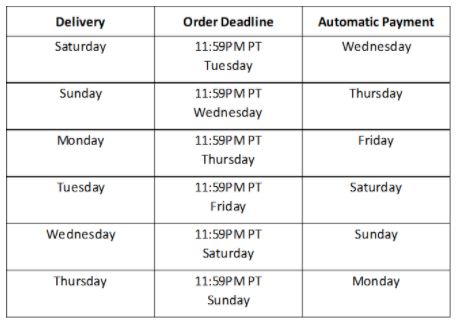
For all orders, these will be charged just after your meal choice deadline, as shown in the chart below. Please allow a few days for charges to appear in your account. If a charge does not go through, you will receive an email with next steps from our Billing team.
Yes you can! If you want to check your previous orders or get an invoice, you can easily do so from your account online.
Just follow these steps:
- Log in to your HelloFresh account.
- Select 'Account Settings' under your name on the right-hand side of the screen.
- Head to 'Orders History' and there you can view all your previous orders and how much you were charged.
- If you'd like us to send you an invoice simply click 'Send Invoice' next to the relevant order and we'll email it over to you. If you are having trouble receiving your invoice, please contact us.
Give the perfect gift with a HelloFresh delivery. Share the joy of cooking with your friends and loved ones and treat them to a HelloFresh delivery for one week. Simply buy a gift card online and wish them Happy Cooking!
This is a one off delivery and no subscription is created. The gift box is available across all our plans.
Just follow these steps:
- Click on the 'Gift Cards' link
- Select the type of box you'd like to give
- Choose the size of the box and the delivery date.
- Add a special note
- Complete the order, and we can either send you the voucher to print off and give to your friend, or you can select a date for us to send the voucher to your friend as an email!
*The recipient will be able to enter their own delivery and meal options when they redeem your special gift.
Purchasing a Gift Card for someone living outside Canada? You must purchase a gift card in the receiver's country for the gift to be valid.
Get ready to have so much fun in the kitchen! But first, follow the instructions in the email notification. Alternatively, do the following:
- Head to HelloFresh.ca.
- Click 'Gift Cards'.
- Click 'Redeem Gift' and follow the prompts to order your box.
If you are already a HelloFresh customer, you can add your gift card on your account with these steps:
- Log in to your account and go to Account Settings
- From the menu bar, select Gifts and discount codes
- Submit the code from the gift card and click Enter code. Your gift card is now applied!
Your gift card recipient will receive an email on the specific day that you indicate. This email will contain step-by-step instructions on how to redeem the gift card. Please note, it can take up to 24 hours for a gift card to be delivered if you choose a card to be sent immediately.
Pro Tip: Your gift card recipient will receive an email on the specific day that you indicate. This email will contain step-by-step instructions on how to redeem the gift card.
To check whether you are eligible to send discounted boxes, log in to your account and click on 'HelloFriends' in the navigation bar. This will appear on the top right on the webpage and on the bottom on the HelloFresh app. It will have a little red number in a circle indicating how many discounted boxes you are able to send.
From here, click on the green button and you’ll be prompted to enter your friend's email address and they'll receive instructions on how to place their order. You can also send discounted boxes by Facebook and Twitter!
We know how excited you must be to receive your delicious box of goodies.
If you're expecting a box, there's a few things you can do to make sure it's still on track for delivery.
- Double check your delivery date. Our deliveries take place between 6am-8pm local time. It may be that the delivery driver hasn't reached you.
- Some areas will receive a tracking number by email to help you keep track of your delivery. Double check your inbox to see if you have this notification.
If your delivery window has passed and your box still hasn't arrived. Please get in touch with our team right away. We'll look into this right away and make sure we make it right.
Absolutely - you'll be the most popular person at the next family reunion! HelloFresh makes a perfect gift for friends or family.
Our discounted first delivery promotion is an offer that we give our customers to spread the HelloFresh cheer. This promotion will be offered to you when you hit certain milestones in the HelloFresh family. You will also receive credit on your account for each discounted box you send and is then claimed!
Please note discounted boxes are for first-time customers only and the recipient will need to sign up for a HelloFresh subscription to redeem this offer. Rest assured, their first box will still be discounted and they can make adjustments to their account at any time. No commitment required!
Absolutely! Our biggest box currently has 6 portions but you can always order a second box to have enough portions for everyone to enjoy our delicious recipes.
In order to order multiple boxes, you'll need to place each order separately. Don't worry though, as long as you use the same login credentials with each order you'll be able to manage both subscriptions in your HelloFresh account.
All of our boxes contain an insulated liner and ice packs to keep your food fresh until you get home! Just pop your kits in the fridge as soon as you can.
Don't forget to check for any proteins or sensitive ingredients that may be hiding at the bottom of your box with the ice packs.
With a HelloFresh's flexible subscription, you will receive a box of fresh ingredients and delicious recipes every week. If you wish to skip a week of your subscription, you have until 11:59pm PST 4 days before your next delivery to update your delivery schedule in your HelloFresh account.
Please read our terms and conditions for further details.
Yes! Our Veggie Recipes is packed with plant-based proteins and veggies- galore!
The Veggie Plan contains no meat or fish. If you like to enjoy seafood or meat occasionally, we recommend our Meat & Veggies Plan! There will be at least 4 vegetarian options available each week in the Meat & Veggies Plan.
We assume you have a bit of a pantry, but we keep it pretty basic.
Some ingredients we recommend keeping hand:
- Butter
- Milk
- Oil
- Pepper
- Salt
- Sugar
We currently don't have a vegan plan, but we recommend checking out our Veggie recipes and see if you can make small substitutions at home that work for your dietary needs.
We do have a lot of vegan customers who still enjoy HelloFresh and substitute certain ingredients from their own cupboard to cater for their particular needs. It's pretty easy to do as we send you all of the ingredients portioned out so that you can easily remove something from the recipe and put in what you need.
Oh no! Sounds like we had a kitchen mix-up. We're sorry to hear you didn't receive your recipe cards this week.
Don't worry - the recipes are available online, so you can view and even print them out. Go to the 'My Deliveries' page in your account to find what you are looking for, and select "Cook It" on the recipe.
Alternatively, download the HelloFresh app, which includes the full recipes plus a fantastic step by step option to walk you through the cooking process, complete with timers and voice control!
Yes! We understand that you might want to modify a meal to suit your preferences, and our customization option is available for select recipes. This feature gives you the flexibility to tailor the recipe to your tastes by substituting specific ingredients — like swapping turkey for ground beef, for example. If you have a picky eater in your household, this option makes it easier to please their palate! To customize your meal, simply look for the “Custom Recipe” label on our weekly menu, click the “customize this meal” icon, and choose your ingredient swap.
Changing your payment details is quick and easy through our secure login area. On the website just follow these steps:
- Log in to your HelloFresh account.
- Click on 'Account Settings' under your name at the top right-hand side of the page.
- Head to 'Payment Methods' and click on 'Change Payment Method' for the subscription you want to change.
- Slick 'Save'!
We know things change and you may decide to choose a different delivery day. Changing your delivery day is easy. Just follow these simple steps:
- Log in to your HelloFresh account.
- Select 'Account Settings' on the right-hand side of the screen, under your name.
- Head to 'Plan Settings' and click 'Manage'.
- Scroll down to 'Delivery', click 'Edit'
- Select a delivery day that is available to you and click 'Save'
- Make sure to make any address changes by your specific deadline.
So that you can sit back, relax and not worry about what meals are coming, you have the option to add a meal preference to your account. You can select one from the following preferences:
- Meat & Veggies
- Quick & Easy
- Veggie
- Family
- Pescatarian
- Flexitarian
- High Protien
- Calorie Smart
- Carb Smart
- No Beef Meals
- No Seafood Meals
- No Fish Meals
- No Shellfish Meals
- No Pork Meals
To add a meal preference to your account, just follow these simple steps:
- Login to your HelloFresh account
- Select 'Account Settings' and go to Plan Settings.
- Click the Menu Preferences dropdown menu to browse the preference types
- Select your preference and click save.
- If you had selected recipes before adding your meal preference, you might need to re-select your meals after! QUICK NOTE! You can still swap your meals if you have a meal preference applied.
We are so happy to hear you're coming back to HelloFresh! To reactivate your subscription, just go to your online account, select the subscription you wish to reactivate and select the ‘Reactivate now’ button.
Once you've reactivated, please update your payment and shipping details in your account to ensure we are sending your box to the correct address. Congrats! You're about to be unstoppable in the kitchen!
You can also reactivate your subscription via the HelloFresh app:
- Login to your HelloFresh account on the app.
- Click 'My menu' at the bottom.
- Select 'Reactivate now' next to the subscription you want to restart.
The main dates to keep in mind are:
- Your delivery date (we offer delivery Saturday - Thursday depending on your postal code)
- Your weekly order deadline (11:59PM PT, 4 days before your delivery).(Please note: your delivery day may be pushed back over long weekends or on statutory holidays, but your order deadline will remain the same.)
- Your automatic payment day, which is the day following your weekly order deadline
You can find the details of these three dates in the chart below:
Changing your payment details is quick and easy through our secure login area.
On the website just follow these steps:
- Log in to your HelloFresh account.
- Click on 'Account Settings' under your name at the top right-hand side of the page.
- Head to 'Plan Settings' and click on 'Manage' for the subscription you want to change. If you have multiple plans, you'll need to adjust them individually.
- Scroll down to 'Payment method'.
- Select 'Change Payment Method'.
- Add your payment information.
- Click 'Save'!
To see the credit available on your account, click on your name at the top of the page and then click 'Account Settings'. Credit will be displayed in the 'Account Info' section, under 'Your credit'.
Note that this will not show any discount codes, just credit.
We want to make sure the person receiving the gift card is in our delivery area. We’d hate for you to buy a gift for someone you love just to find out that they can’t receive a box.
If you're not familiar with the recipients delivery address, you can simply enter your own address. The recipient will be able to enter their own delivery and meal options when they redeem your special gift.
If you send a gift card and the recipeint is unable to redeem this, please contact us.
Our delivery window is 6am-8pm local time on your selected delivery day!
We offer delivery Saturday - Thursday depending on your postal code. You can check which days are available in your area in your 'Account Settings' or by reaching out us through chat.
Depending on your area, some customers will receive a shipment notification with tracking information. Otherwise, you can expect your box to be delivered on your delivery day before 8pm local time.
Our Customer Care team will always aim to contact you should we expect any changes to your normal delivery window and/or we experience any delays.
Absolutely! Many customers choose to have their box delivered to their work address rather than having it left at their home.
Please note that while our couriers make an effort to service business addresses during business hours, our guaranteed delivery window remains 8am-8pm local time.

About Hellofresh

Our Boxes

Recipes and Ingredients

Sustainability and Recycling

My Account

My Payments

Vouchers and Gift Cards

My Delivery
