

Frequently Asked Questions
My Account
To change your delivery address online, please follow these simple steps:
- Log in to your HelloFresh account.
- Click on 'Account Settings' under your name at the top right-hand side of the page.
- Head to 'Plan Settings' and click on 'Manage' for the subscription you want to change. If you have multiple plans, you'll need to adjust them individually.
- Scroll down to 'Delivery'.
- Click on 'Edit' next to 'Delivery Address'.
- Make your address change and press 'Save'.
- Make sure to make any address changes by your specific deadline.
Voila! It's that easy!
Changing your payment details is quick and easy through our secure login area. On the website just follow these steps:
- Log in to your HelloFresh account.
- Click on 'Account Settings' under your name at the top right-hand side of the page.
- Head to 'Payment Methods' and click on 'Change Payment Method' for the subscription you want to change.
- Slick 'Save'!
We know things change and you may decide to choose a different delivery day. Changing your delivery day is easy. Just follow these simple steps:
- Log in to your HelloFresh account.
- Select 'Account Settings' on the right-hand side of the screen, under your name.
- Head to 'Plan Settings' and click 'Manage'.
- Scroll down to 'Delivery', click 'Edit'
- Select a delivery day that is available to you and click 'Save'
- Make sure to make any address changes by your specific deadline.
If for any reason you need to change your personal details such as your email address or password, it's super easy to do:
- Log in to your HelloFresh account.
- Click on 'Account Settings' under your name at the top right-hand side of the page.
- Head to 'Account Info' and click on 'Edit' for the field you need to change.
- Don't forget to press 'Save'!
You can easily update your password, simply click here.
There can be a few reasons why you're unable to reset your password:
Reset password link is going to Spam
Check your Spam to see if the email password reset is hanging out there instead of your inbox.
There's an issue with the browser
Try clearing the cookies and cache of your browser as this sometimes prevents the email from being sent. We always suggest using Chrome or FireFox to manage your HelloFresh account.
Incorrect Email address
Check your inbox to see if you have received any emails regarding your order, if not, this could mean your email address was entered incorrectly. If you think this is the case, contact Customer Care here.
Once you have ordered your box, you can go into your account and choose the recipes that make your jaw drop every week. You can choose meals up to 4 weeks in advance! To update your meals, just follow these simple steps:
- Log in to your account
- Head to 'My Deliveries' on the left-hand side of the page.
- Click the arrows next to the dates to advance to future weeks.
- Select the meals you'd like in your box by clicking the negative or plus button.
- Click 'Continue to our expanded menu' and select any extra market items you may like.
- Select 'Confirm Order' to save your selection.
FreshTip: Don’t forget that the cut-off for your meal changes is specific to your deadline.
We know that life is unpredictable and some weeks you may gain a few visitors to your dining table. That's why we have made changing your box type as easy as possible.
On the website just follow these steps:
- Log in to your HelloFresh account.
- Head to 'My Deliveries' on the left-hand side of the page.
- Click 'Edit Delivery' then 'Change box size'
- Choose your new box size and press 'Confirm'.
- Make sure to make any address changes before your specific deadline.
So that you can sit back, relax and not worry about what meals are coming, you have the option to add a meal preference to your account. You can select one from the following preferences:
- Meat & Veggies
- Quick & Easy
- Veggie
- Family
- Pescatarian
- Flexitarian
- High Protien
- Calorie Smart
- Carb Smart
- No Beef Meals
- No Seafood Meals
- No Fish Meals
- No Shellfish Meals
- No Pork Meals
To add a meal preference to your account, just follow these simple steps:
- Login to your HelloFresh account
- Select 'Account Settings' and go to Plan Settings.
- Click the Menu Preferences dropdown menu to browse the preference types
- Select your preference and click save.
- If you had selected recipes before adding your meal preference, you might need to re-select your meals after! QUICK NOTE! You can still swap your meals if you have a meal preference applied.
That's the best thing about a HelloFresh subscription - you can customize your deliveries to suit your needs. If you're travelling or would just like to skip a delivery (or two) for any reason, follow these easy steps. On the website just follow these steps:
- Log in to your HelloFresh account.
- Head to 'My Deliveries' on the left-hand side of the page.
- Click 'Edit Delivery' then 'Skip this week'
- Make sure to make any changes by your deadline.
We're sorry to see you go! Keep in mind that you can always skip a delivery if you need to take a break for a week or two.
Cancelling your subscription is easy, you just need to go to follow these steps:
- Log in to your HelloFresh account on our website.
- Click on your name at the top of the page, select Account Settings'.
- Scroll down to the 'Status' section and click on 'Cancel Plan' on the left-hand side.
- We'd appreciate if you could complete the short survey and let us know what you thought of your HelloFresh experience or how we can do better.
- You will receive an email confirming your cancellation, please retain this for future reference.
We are so happy to hear you're coming back to HelloFresh! To reactivate your subscription, just go to your online account, select the subscription you wish to reactivate and select the ‘Reactivate now’ button.
Once you've reactivated, please update your payment and shipping details in your account to ensure we are sending your box to the correct address. Congrats! You're about to be unstoppable in the kitchen!
You can also reactivate your subscription via the HelloFresh app:
- Login to your HelloFresh account on the app.
- Click 'My menu' at the bottom.
- Select 'Reactivate now' next to the subscription you want to restart.
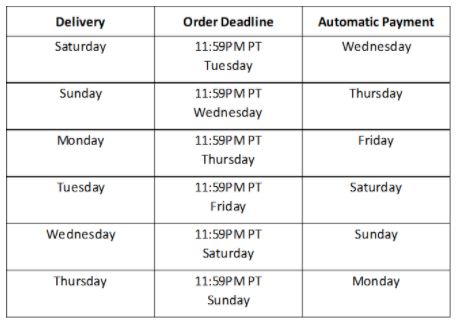
The main dates to keep in mind are:
- Your delivery date (we offer delivery Saturday - Thursday depending on your postal code)
- Your weekly order deadline (11:59PM PT, 4 days before your delivery).(Please note: your delivery day may be pushed back over long weekends or on statutory holidays, but your order deadline will remain the same.)
- Your automatic payment day, which is the day following your weekly order deadline
You can find the details of these three dates in the chart below:
If you are using an iPhone or iPad, you can request to delete your account directly through the HelloFresh app. Follow these steps:
Select the 'Profile' and navigate to the 'Personal Info' section in your app settings.
Tap the 'Delete Account' button.
Note: If you have an active subscription, you must cancel it first. You will see a "Go to website" link to complete the cancellation.
Once your subscription is cancelled, return to the app and select 'Send Request'. This will generate a pre-populated request to our Data Protection team to begin the deletion process.
Currently, the "Delete Account" button is a specific feature for iOS users. If you are using an Android device or a web browser please click HERE.
Please note that the process of fulfilling your request may take up to 90 calendar days. Be advised that we cannot delete all information immediately, as we must retain a minimal record of your request and certain historical data as necessary to complete a contract, fulfill a legal obligation, or comply with other statutory exceptions.